Peanut Script Language
Introduction
Peanut is an interpreted script language. The Peanut script syntax is devised as that like a C program.
Basically a Peanut script is divided into functions. The main() function declared in the global namespace is the function that Peanut starts to run. Besides the built-in functions that the interpreter provides and user-implemented functions, Peanut is extensible by loading extension modules.
Conceptually, Peanut is devised for the programmer to construct scripts with the following "layering relationship". A script is based on built-in functions and extension modules. A extension module is based on APIs provided by the Peanut interpreter.
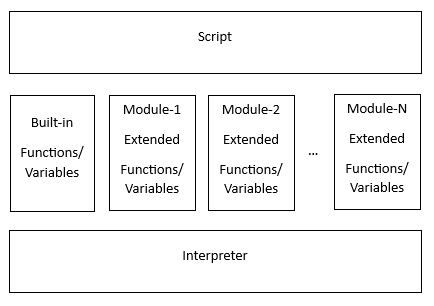
The major features of Peanut are:
- Multitasking programming
- Declarations with namespace resolutions
- Untyped variable
- Value passing and reference passing
- Sub-array passing
- Object programming
- Extensible
- High-level C-like syntax
- Conditional Inclusion
- Check Without Running
Document
Peanut Script Language DocumentPackage
Download The PackageIn the following, example scripts are illustreated for the features.
Tutorials
Hello World!
Let's start Peanut programming.
In this script, print() is a built-in function provided by the script interpreter.
main() is the entry of the script.
main()
{
    print("Hello World\n");
}
Say the script is saved as hello.pnt file. Use below command to run it.
pni hello.pnt
Command line
The user can issue the --help option to display Peanut usages:
user1@pc:~/peanut$ pni --help
Usage: pni (--help | --version)
       pni FILE [args]
       pni --check FILE
Run a Peanut script or query extension module information.
  --help            Display this help and exit.
  --version         Output version information and exit.
  FILE [args]       Run FILE (script) with/without arguments.
  --check FILE      Check FILE (script) syntax and bindings or
                    query FILE (extension module) information.
Unlike some script languages which are designed to do checks and executions of the scripts in run time, Peanut does most script checks before running them. A Peanut script is run only when syntax and constants/functions/variables references are error free. Besides, the option --check is supported for checking script files only even if the scripts are free of errors.
Extension modules usage
Based on 'Extension APIs' provided by Peanut, a Peanut extension module can be developed in C. The 'Extension APIs' assist an extension module to define functions, global variables, global constants, and structures for use in scripts.
To utilize an extension module, the script has to use a #load statement to incoporate the module. For the following sample code as an example, the script incoporates the "pxm_clib.pxm" module and calls the function c::printf() provided by the module with 2 arguments: "Hello World! %d\n" and 123, where c:: is the namespace in which printf is defined.
#load <pxm_clib.pxm>

main()
{
    c::printf("Hello World! %d\n", 123);
}
Untyped variable
An elementary variable declared in a script can be used to store any type of data: string, integer number, or floating number. For the following as an example, the variable v is used to store "10.0", 10, and 10.0 in 3 statements.
main()
{
    var v;

    v = "10.0";
    print("v is ", v, "\n")

    v = 10;
    print("v is ", v, "\n")

    v = 10.0;
    print("v is ", v, "\n")
}
Output:
v is 10.0
v is 10
v is 10.000000
An arrary is a set of elementary variables. Each element of an array is untyped.
The following is an example saving 3 different types of data into the same array.
main()
{
    var a[3], i;

    a[0] = "10.0";
    a[1] = 10;
    a[2] = 10.0;

    for (i = 0; i < 3; ++i)
        print("a[", i, "] = ", a[i], "\n");
}
Output:
a[0] = 10.0
a[1] = 10
a[2] = 10.000000
Value passing and reference passing
In the following script, either the function funcV() or the function funcR() is declared as a function with two parameters a and b. The only difference between the function funcV() and the function funcR() is that there is an ampersand, that is &, existing before each parameter of the function funcR().
A function parameter following an ampersand sign is a call-by-reference parameter. Changing value to a call-by-reference parameter causes the argument variable changed in the caller side, too. This kind of scheme to pass data to the callee function is reference passing. Only a variable can be the argument to a call-by-reference parameter.
A function parameter without an ampersand sign preceeded is a call-by-value parameter. Changing value to a call-by-value parameter does not cause the argument variable. This kind of scheme passing data to the callee function is value passing.
#load <pxm_clib.pxm>

funV(a, b)
{
    var t;

    // one of {a, b} is a string; the other one is an integer

    if (isstring(a))
    {
        t = b;
        b = a;
        a = t;
    }

    c::printf("in %s: %d %s\n", __FUNCTION__, a, b);
}

funR(&a, &b)
{
    var t;

    // one of {a, b} is a string; the other one is an integer

    if (isstring(a))
    {
        t = b;
        b = a;
        a = t;
    }

    c::printf("in %s: %d %s\n", __FUNCTION__, a, b);
}

main()
{
    var A = "kg";
    var B = 10;

    print("in ", __FUNCTION__, ": A = ", A, " B = ", B, "\n");
    funV(A, B);
    print("in ", __FUNCTION__, ": A = ", A, " B = ", B, "\n");
    funR(A, B);
    print("in ", __FUNCTION__, ": A = ", A, " B = ", B, "\n");
}
Output:
in main: A = kg B = 10
in funV: 10 kg
in main: A = kg B = 10
in funR: 10 kg
in main: A = 10 B = kg
Sub-array passing
It is allowed to pass partial array data to the callee function in a Peanut script. Peanut uses an array sub-range expression to specify the portion of a specific array dimension being passed.
For the following script as an example, a 2-dimension array is used to represent a matrix. In the example script, adding matrix A and B and assigning the result to matrix S1 is done by 1 function call to matrix_add(), but adding matrix A and B and assigning the result to matrix S2 is done by 4 rounds of function calls to matrix_add() where each round passes sub-matrix of A, sub-matrix of B, and sub-matrix of S1. Passing a sub-matrix of A (or B or S2) is achived by passing the partial array to the callee function.
#load <pxm_clib.pxm>

matrix_add(m, n, &S[][], &X[][], &Y[][])
{
    var i, j;

    for (i = 0; i < m; ++i)
    for (j = 0; j < n; ++j)
        S[i][j] = X[i][j] + Y[i][j];
}

main()
{
    var i, j, bEqual;
    var A[5][5], B[5][5], S1[5][5], S2[5][5];

    for (i = 0; i < 5; ++i)
    for (j = 0; j < 5; ++j)
    {
        A[i][j] = c::rand() % 50;
        B[i][j] = c::rand() % 50;
    }

    // S1 = A + B
    matrix_add(5, 5, S1, A, B);

    // S2 = A + B; using sub-array passing
    matrix_add(3, 2, S2[0..2][0..1], A[0..2][0..1], B[0..2][0..1]);
    matrix_add(3, 3, S2[0..2][2..4], A[0..2][2..4], B[0..2][2..4]);
    matrix_add(2, 2, S2[3..4][0..1], A[3..4][0..1], B[3..4][0..1]);
    matrix_add(2, 3, S2[3..4][2..4], A[3..4][2..4], B[3..4][2..4]);

    // display S1
    c::printf("S1 = \n");
    for (i = 0; i < 5; ++i)
    {
        for (j = 0; j < 5; ++j)
            c::printf(" %2d", S1[i][j]);
        c::printf("\n");
    }
    c::printf("\n");

    // display S2
    c::printf("S2 = \n");
    for (i = 0; i < 5; ++i)
    {
        for (j = 0; j < 5; ++j)
            c::printf(" %2d", S2[i][j]);
        c::printf("\n");
    }
    c::printf("\n");

    // compare S1 and S2
    bEqual = 1;
    for (i = 0; i < 5; ++i)
    for (j = 0; j < 5; ++j)
        if (S1[i][j] != S2[i][j])
        {
            bEqual = 0;
            goto out;
        }

tag out:
    c::printf("S1 %s S2\n", bEqual ? "is equal to" : "is not equal to");
}
Output:
S1 =
 38 16  0 64 10
 56 44 60 38 12
 64 70 38 48 38
 52 34 56 36 16
 74  8 46 18 46

S2 =
 38 16  0 64 10
 56 44 60 38 12
 64 70 38 48 38
 52 34 56 36 16
 74  8 46 18 46

S1 is equal to S2
Multitasking programming
To start a task in a Peanut script is done by the built-in function task_create(). Refer to the following sample code, the script starts 2 trivial tasks; each of the tasks outputs some message and terminates.
#load <pxm/pxm_clib.pxm>

task_function1(arg)
{
    sleep(100);
    print(arg, " from ", __FUNCTION__, "\n");
}

task_function2(arg)
{
    c::printf("%d from %s\n", arg, __FUNCTION__);
}

main()
{
    var t1, t2;

    t1 = task_create(task_function1, "Hello World");
    t2 = task_create(task_function2,  20000000000);

    task_join(t1);
    task_join(t2);
}
Output:
20000000000 from task_function2
Hello World from task_function1
Object programming
To provide a higher level approach to encapsulate datum and functions more tightly, Peanut uses structures for defining the tight relation of datum and functions. Each data in a stucture could be an elementary variable, an array of elementary variables, an object (i.e. a structure variable), or an array of objects (i.e. an array of structure variables). Functions declared in a structure are planned to process datum of the object of the structure. Variables declared in a structure are called member data. Functions declared in a structure are called the member functions.
As the following script shown, the struct Point is declared with two elementary variables, X and Y which mean a coordinate in a plane, and one function init(). The struct Line is declared with a 2-element array of struct Point. In the main() function, L1 is an object with type struct Line. The member functions are called to manipulate the member data by refering the concatenation of object name, member data name(s), and the function name with dot between each other.
#load <pxm/pxm_clib.pxm>

struct Point
{
    var X, Y;

    init(x, y)
    {
        X = x;
        Y = y;
    }
};

struct Line
{
    struct Point points[2];

    length()
    {
        var dx, dy;

        dx = points[0].X - points[1].X;
        dy = points[0].Y - points[1].Y;

        return (c::sqrt(dx * dx + dy * dy));
    }
};

main()
{
    struct Line L1;

    L1.points[0].init(0, 0);
    L1.points[1].init(3, 4);

    c::printf("length of L1 = %2.1f\n", L1.length());
}
Output:
length of L1 = 5.0
Namespace
Namespace is a mechanism for programmers to devise scripts with higher-level modualization and avoiding name conflicts. Functions, global variables, constants, and structures can be defined within a namespace. The namespace resolution should precede the function (or a global variable, or a constant, or a structure) name if the function is declared in a namespace. Without precisely specifying namespace resolution preceding the name, Peanut search the name from the namespace where the name is referred to "outer" namespaces.
Below is a namespace usage example. In the example, there are two statements declaring gvar: one statement is in the global namespace and the other is in namespace A. Similarly, there are 2 main() functions. Besides, a print() function is defined in namespace A, where a built-in print() function exists in the global namespace.
var gvar1 = 3;
var gvar2 = 7;

namespace A
{
    var gvar1 = 0;

    main()
    {
        gvar1 = 5;
        gvar2++;
    }

    print(void)
    {
        ::print(" ::gvar1 = ",  ::gvar1, "\n");
        ::print("A::gvar1 = ", A::gvar1, "\n");
        ::print("   gvar1 = ",    gvar1, "\n");
        ::print("   gvar2 = ",    gvar2, "\n");
    }
}

main()
{
    A::print();

    A::main();
    print("After A::main() is called.\n");

    A::print();
}
Output:
 ::gvar1 = 3
A::gvar1 = 0
   gvar1 = 0
   gvar2 = 7
After A::main() is called.
 ::gvar1 = 3
A::gvar1 = 5
   gvar1 = 5
   gvar2 = 8
Conditional Inclusion
Peanut supports a set of directives for conditional inclusions. These directives effect when the scripts are parsed. According to the evaluation value (0 or not 0) of the condition expressions, Peanut conditionally adopt statements. #if, #elif, #else, and #endif directives are supported for conditional inclusions. Usages of the directives look like the followings:
statements-A

#if expr-1

    statements-1

#elif expr-2

    statements-2

#elif expr-3

    statements-3

#else

    statements-e

#endif

statements-B
Between Statements-A and Statements-B, one of statements-1, statements-2, statements-3, and statements-e is adopted. When Peanut parses the script, it checks whether expr-1 is non-zero. If yes, then statements-1 is adopted; otherwise if expr-2 is non-zero, statements-2 is adopted; if no one of expr-1, expr-2, and expr-3 is non-zero, statements-e is adopted.
The '#elif expr' and '#else' are optional.
Below is an example showing conditional-inclusion directives are used to adopt statements executed in run-time.
const v1 = 100;
const v2 = 200;

main()
{
#if v1 == v2
    print("v1 is ", v1, " and it is");
#else
    print(v1, " is");
#endif

#if v1 > v2
    print(" greater than ");
#elif v1 < v2
    print(" less than ");
#else
    print(" equal to ");
#endif

#if v1 == v2
    print("v2.\n");
#else
    print(v2, ".\n");
#endif
}
Below is another example demostrates that the #if directive is used to determine the num parameter of selection_sort() function be a call-by-value parameter or a call-by-reference parameter.
const CONFIG_CBR = 1;

...

#if CONFIG_CBR != 0
selection_sort(&num[], n)
#else
selection_sort( num[], n)
#endif
{
    var i, j, si, sv;   //si : index of the smallest value
                        //sv : the smallest value
    var temp;

    for (i = 0; i < n; ++i)
    {
        si = i;
        sv = num[si];

        for (j = i; j < n; ++j)
        {
            if (num[j] < sv)
            {
                sv = num[j];
                si = j;
            }
        }

        //swap num[i] and num[si] (sv)
        temp = num[i];
        num[i] = num[si];
        num[si] = temp;
    }

    print("Sorting result:\n");
    for (i = 0; i < n; ++i)
        print(num[i], "\n");
}