Penetrate - NVMe SSD Test Software
Download
Last updated: 2024/10/24
| Linux Package | penetrate-1.2.0-demo.tar.gz | Set up on Ubuntu 22.04/20.04 |
| Windows Package | penetrate-1.2.0-demo.rar | Set up on Windows 10 |
Note
The version and file name of the download package may be different from what is mentioned in below sequence.
Host Reference System
- ASUS STRIX Z590-A WIFI GAMMING mother board
- 16-GB RAM
On Ubuntu 22.04/20.04
System Update and Settings
user1@pc:~$ sudo apt-get update
user1@pc:~$ sudo apt-get install libconfig-dev libusb-dev
user1@pc:~$ sudo sysctl -w vm.nr_hugepages=1024
Decompress and Run Hello World
user1@pc:~$ tar -zxvf penetrate.tar.gz
user1@pc:~$ cd penetrate
user1@pc:~/penetrate$ sudo pni hello.pnt World
Hello World!
Set up DUT
Say the DUT is /dev/nvme0.
user1@pc:~/penetrate$ sudo -s
root@pc:/home/user1/penetrate$ sdut --vfio-noiommu nvme0
Success: nvme0
If IOMMU is enabled on your system, use --vfio-iommu option.
root@pc:/home/user1/penetrate$ sdut --vfio-iommu nvme0
Run Sample Scripts
Change working directory into main.
root@pc:/home/user1/penetrate$ cd main
Test Sequential Read Speed
root@pc:/home/user1/penetrate/main$ pni a01_seqRdSpeed_1t1q.pnt
The test log is put at log/a01_seqRdSpeed_1t1q.pnt/.
Test Sequential Write Speed
root@pc:/home/user1/penetrate/main$ pni a06_seqWrSpeed_1t1q.pnt
The test log is put at log/a06_seqWrSpeed_1t1q.pnt/.
Test SR-IOV virtual functions
root@pc:/home/user1/penetrate/main$ pni b02_seq_mdevs_mfuns_mparts.pnt
Check the test result in log/b02_seq_mdevs_mfuns_mparts.pnt/.
TCG Opal: Level 0 Discovery
root@pc:/home/user1/penetrate/main$ pni u10_Level0Discovery.pnt
The test log is put at log/u10_Level0Discovery.pnt/.
TCG Opal: List SP
root@pc:/home/user1/penetrate/main$ pni u11_ListSP.pnt
The test log is put at log/u11_ListSP.pnt/.
Run Opal Test Cases: A02 A03 A04 A05 A07 A08
root@pc:/home/user1/penetrate/main$ pni opal_test_cases_nvme.pnt
The test log is put at log/opal_test_cases_nvme.pnt/.
Revert by PSID
Say the PSID is 12345678901234567890123456789012
root@pc:/home/user1/penetrate/main$ pni u16_Revert_byPSID.pnt 12345678901234567890123456789012
On Windows 10
Note
Windows 10 should not be installed on an NVMe device. Before following below steps, make sure that Windows 10 is installed on a for example SATA disc.
Install WinDriver v16.3.0
The Peanut NVMe extension module is based on WinDriver v16.3.0. WinDriver v16.3.0
trial version is available at
https://jungo.com/windriver/files/.
Remember to restart Windows 10 after this installation.
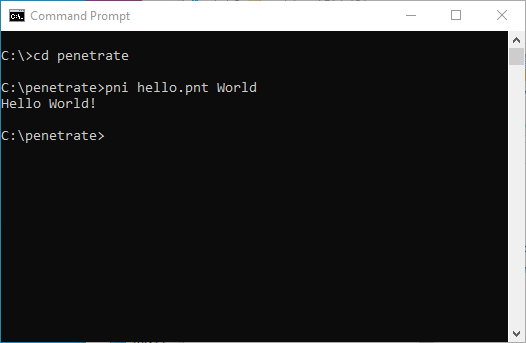
Decompress and Run Hello World
- Decompress penetrate.rar
- Move "penetrate" directory to for example C:\
- Invoke Command Prompt window
- Change working directory to "penetrate"
- Execute "pni hello.pnt World" on Command Prompt window
Disable Device on Computer Management
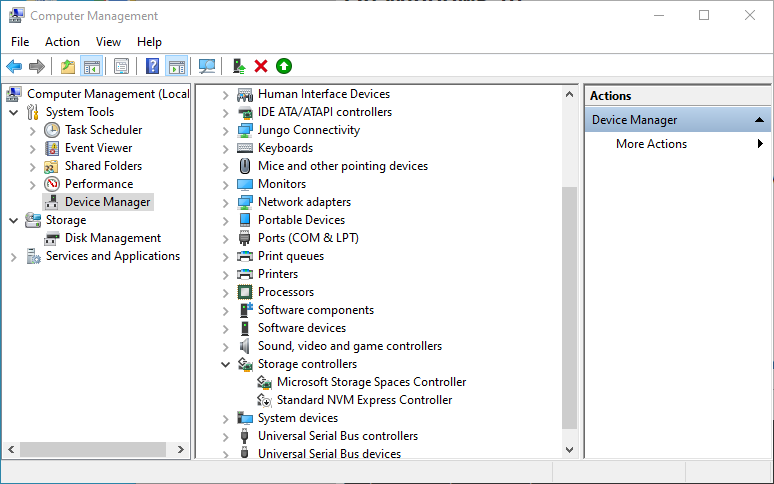
Penetrate "grabs" all detected NVMe devices on the system. To fully
control any NVMe device, it is necessary to disable each NVMe device
on Computer Management.
Follow the steps to disable NVMe devices.
- Invoke "Computer Management"
- Right Click on "Standard NVM Express Controller"
- Select "Disable device"
Run Sample Scripts
Change working directory into main.
C:\penetrate> cd main
Test Sequential Read Speed
C:\penetrate\main> ..\pni a01_seqRdSpeed_1t1q.pnt
The test log is put at log\a01_seqRdSpeed_1t1q.pnt\.
Test Sequential Write Speed
C:\penetrate\main> ..\pni a06_seqWrSpeed_1t1q.pnt
The test log is put at log\a06_seqWrSpeed_1t1q.pnt\.
TCG Opal: Level 0 Discovery
C:\penetrate\main> ..\pni u10_Level0Discovery.pnt
The test log is put at log\u10_Level0Discovery.pnt\.
TCG Opal: List SP
C:\penetrate\main> ..\pni u11_ListSP.pnt
The test log is put at log\u11_ListSP.pnt\.
Run Opal Test Cases: A02 A03 A04 A05 A07 A08
C:\penetrate\main> ..\pni opal_test_cases_nvme.pnt
The test log is put at log\opal_test_cases_nvme.pnt\.
Revert by PSID
Say the PSID is 12345678901234567890123456789012
C:\penetrate\main> ..\pni u16_Revert_byPSID.pnt 12345678901234567890123456789012